
From Training Videos to My First AI Personal Assistant
Introduction
Late last year I attended Jared’s Spowart’s presentation on the “virtual actuary” and it really stuck with me. It got me thinking seriously about what might be possible using AI in agentic workflows—moving beyond prompts into coordinated systems. But thoughts remained thoughts and nine months slipped by without me taking meaningful action. Fast forward to June 2025 at the actuarial summit, and Minh Phan’s talk reignited the spark. It wasn’t just entertaining, it offered a practical framework for getting started. That combination of reflection and renewed motivation pushed me to finally begin. This blog marks my first hands-on build: an AI personal assistant. It’s the opening challenge in my series on learning to combine AI with automation in practical, replicable ways.
Why I Chose This Project
I kind of stumbled into the AI personal assistant as my first use case through a combination of factors. Agentic AI was the buzzword of the moment, and I wanted to understand what it really meant in practice. An AI personal assistant is a very popular use case and YouTube was full of accessible tutorials, which made it easy to find starting points. I was also drawn to the idea of replicating some of the functionality I saw in Jared’s Virtual Actuary presentation—but beginning with something more simplified and achievable (a team of 'interns' instead of 'actuaries')! Most of all, I was curious about how to configure the integrations and interactions: how one AI agent could select and trigger another agent, or pass tasks off to deterministic processes. In my experience integration is one of the most time‑consuming and challenging layers of any process build. It frequently slows projects down and pushes teams to limit handoffs or stick within a single ecosystem. Part of my motivation here was to see whether the same holds true in the AI context, or if these new tools could make integration smoother and less painful.
That mix of curiosity, inspiration, and practical entry points is what led me to this as the initial project.
Oh - and I also hoped it would save me some time spent on admin each day!
Getting Started – Training and Tools
Before diving in, I went back through my notes from Minh’s session at the summit. One of his slides listed his “personal favourite open source tools,” and that got me exploring. Knowing I wanted to start with an automation and assistance use case, I asked ChatGPT to give me comparisons and descriptions of the different tools Ming had listed: n8n, Pydantic AI, LangChain, and Llama Index.
From there, I decided to start with n8n. n8n is an open-source workflow automation tool that lets you visually connect apps, APIs, and AI models into automated processes.
What appealed to me was its combination of features: a clean, intuitive GUI for building workflows; a low-code approach that made it quick to learn but still flexible with code nodes when needed; and the reassurance of being open source and self-hostable. I liked that it already had pre-existing AI nodes (which turns out to be using LangChain under the hood) plus some AI-powered debugging assistance in GUI. Finally, it offered a healthy catalogue of existing integration nodes, plus generic nodes for webhooks and custom API calls to configure your own, and a strong community that regularly contributes new nodes and solutions.
Once I’d chosen n8n, I started searching YouTube for tutorials and quickly came across Nate Herk’s training videos. His content is pitched at beginners or 'non-coders', showing how to build workflows in n8n in a very accessible way. I found a supercut video which stitched together 8.5hrs of his tutorials, explanations, and insights … and in amongst the 15 or so builds it included an AI personal assistant. I decided to commit to doing the whole thing start to finish and dove in.
Building the Personal Assistant
Full disclosure - I followed Nate’s section on multi-agent architectures to create a parent agent connected to several specialised sub-agents rather than designing and building from scratch. So instead of rehashing all that here if you want the exact detailed step-by-step go to the 20min section “Multi Agent System Architecture” (04:35 to 04:55) of Nate’s video (find the link at the bottom in resources).
How it works - High level overview
Telegram is used as the interface to chat with the personal assistant via voice or text prompts. The Personal Assistant (Parent Agent node below) has been configured with a number of ‘tools’ it can access with instructions in its systems prompt on how to use them.
The applications used by each agent are:
Calendar Agent: Google Calendar
Email Agent: Gmail
Contact Agent: Airtable (a cloud-based platform that combines the structure of a spreadsheet with the functionality of a database)
Content Agent: Tavily (a platform / API service that gives AI agents real-time access to the web)
If you want to know the underlying details such as what systems prompts were used, how to configure, how to create credentials, etc. watch the vid! And if there is anything it misses you can also download a copy of Nates agent which he provides free (I recommend try building it first though).
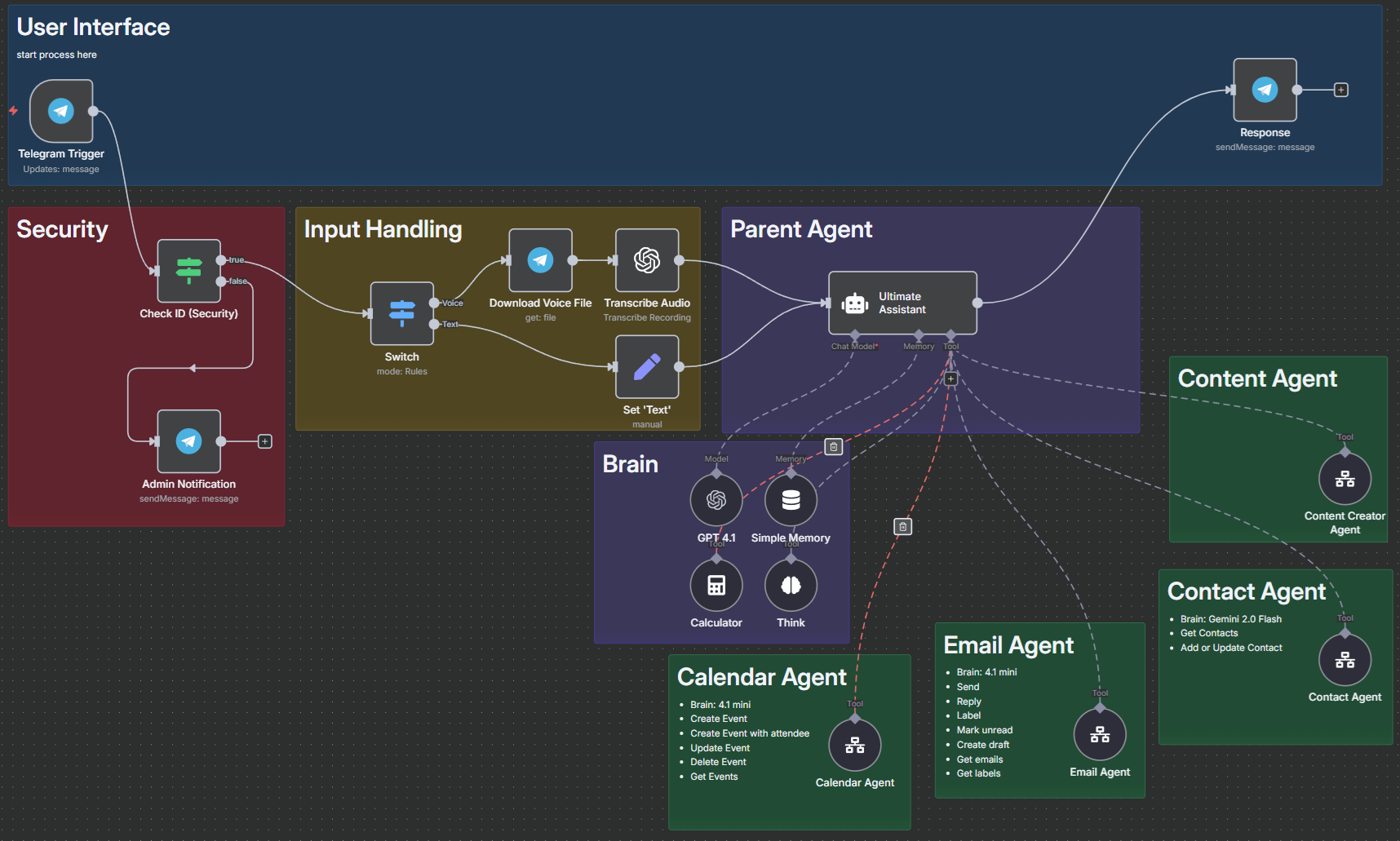
Orchastration Workflow with Parent Agent
The green boxes represent the 4 sub-agent workflows and each tool is a “call n8n workflow tool” node. Note that the sub-agents can be configured directly as tool calls in the same workflow, however they have been configures within their own separate n8n workflow. This keeps things a bit cleaner in the parent workflow, helps with version control and maintenance, and adds re-usability of sub-workflows (think of them like functions in a library that can be called by any other workflows). The downside is it add an extra layer of complexity in configuration and debugging - but worth it in the long run.
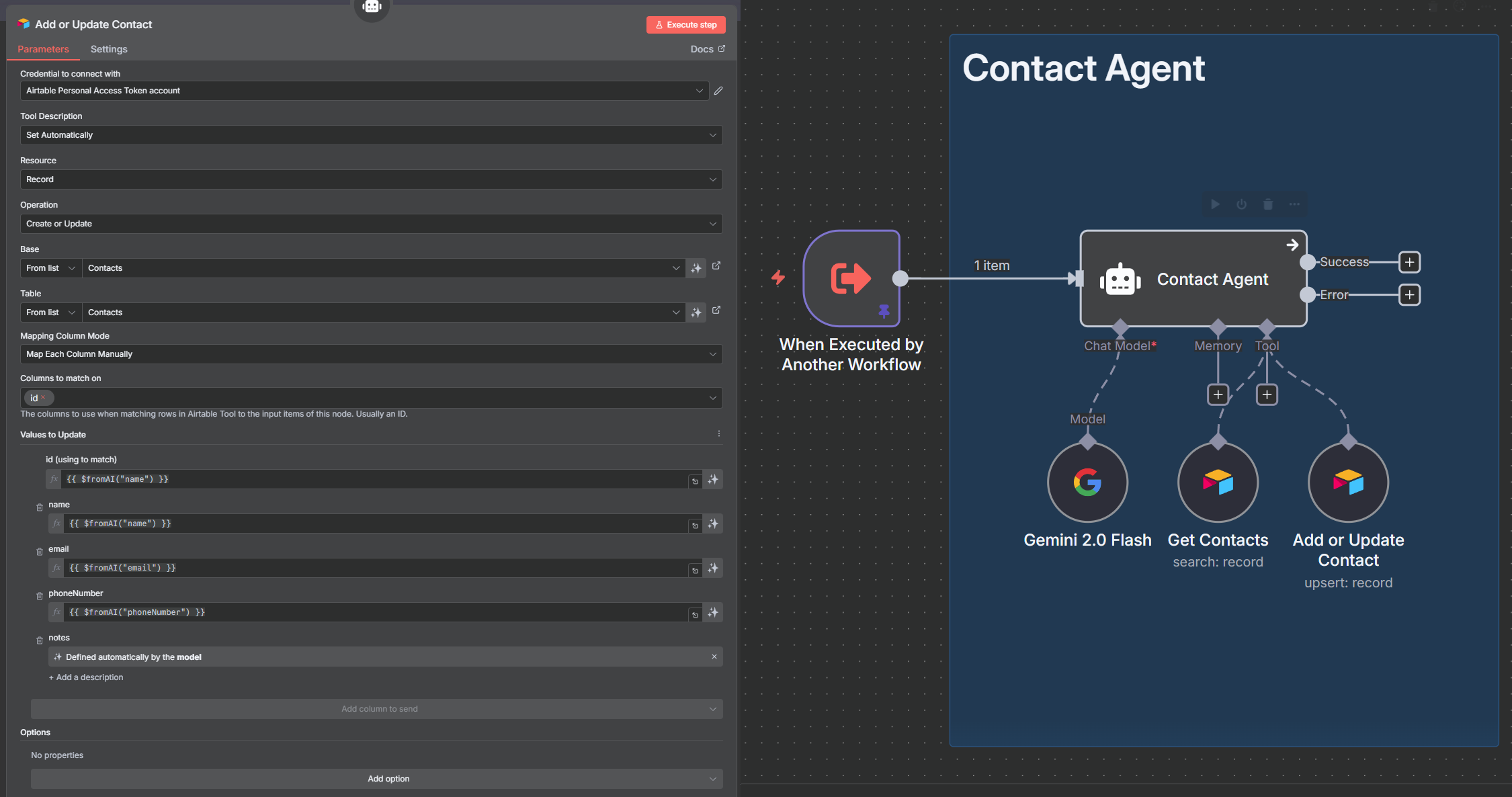
Example of sub-workflow: The Contact Agent
Modification - Security Check
The build itself was ~90% reproduction from the training. Other than small configuration variances I made one addition - I added some basic security.
The AI assistant listens for messages via a Telegram bot. To avoid anyone other than myself from giving the AI assistant instructions I added an ID check to make sure only my account could trigger this workflows. A simple “IF” statement node is used to check if the telegram ID from the trigger matches my credentials, if TRUE it proceeds with the AI workflow, but if FALSE it notifies me with information of the attempted trigger (i.e. ID, username, message) and ends the process.
Testing
Normally when developing I build test cases as I go in a way that is repeatable so I can easily re-run and refine the code/configurations as issues are identified. As this build is mostly a reproduction from a training video I focused on completing the steps - include the checks performed during training - rather than building my own. Following the build I’ve retested basic functionality at a high level, noting where I would need to make improvements or refinements. As I’m eager to move onto my second challenge building from scratch I’ve deferred working on customisation to future date, but will share my observations here.
Test Cases -
Adding new contacts with all required information directly supplied
Adding new/updating contacts with partial information directly supplied
Adding new/updating contacts use indirect information (acquire information from an email signature)
Creating and sending knowledge articles (reasonableness check)
Creating calendar events and inviting individuals
Resolving contact ambiguity when only partial ID provided
See below the prompts and response via telegram.
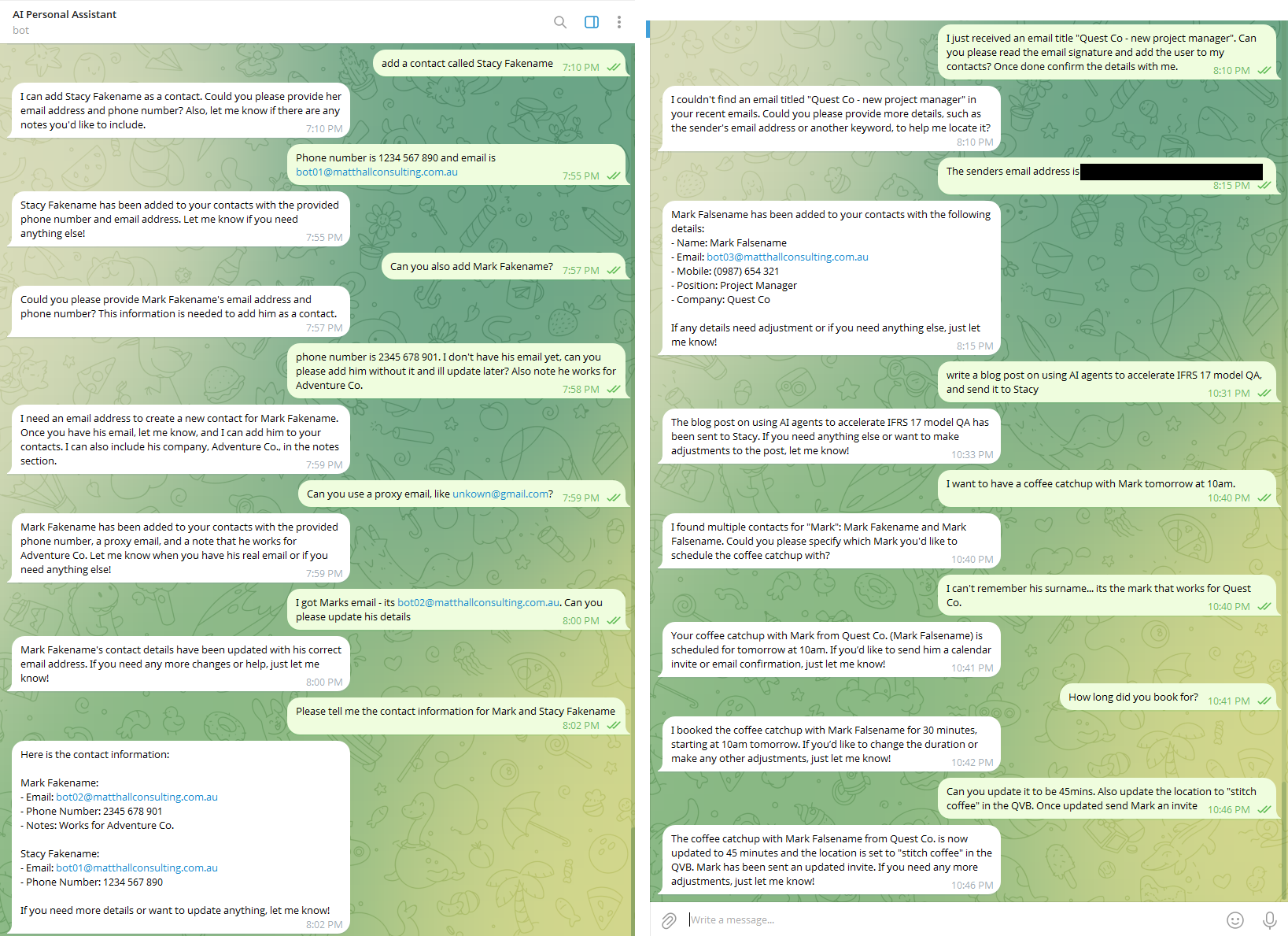
screenshots of user interface (telegram) in testing
Contact & Email Agent Checks
Test 1 and 2 (Mark and Stacy Fakename) were completed, though it struggle with being provided only partial information for Mark. As the contact agent has been configured to expect Name, Phone Number, and Email with notes as optional its actually working as intended… If in practice I want partial complete option I would make configuration changes to the contact agent tool for adding/updating records.
Test 3 is more complex as it requires the parent agent to first work with the Email agent to find the correct email, then parse the contents to find the requesting information (email signature), then pass it on to the contact agent to record the information. The process fails on its first matching attempt using just the subject line, however completes successfully once I provide additional matching criteria (senders email address).
Checking the backend (Airtable) to confirm data is actually recorded and updated correctly test 1 and 3 pass but I find an issue with test 2. Mark Fakename has been recorded twice - first entry has the proxy email (unknown@gmail.com), and a 2nd entry has been created for bot02@matthallconsulting.com.au, rather than updating the first record. Interestingly it has returned the intended record in telegram when I asked the AI assistant to retrieve it… but its unclear if this would always be the case. More testing and refinement is required with the Contact agent before using extensively.
Content Agent Checks
Test 4 is more complex again requiring the parent to work with 3 agents - contacts, content, and email agents. The process took a bit longer (~2mins) while it searched and prepared the knowledge article. It also used its memory and thinking steps to help hold and sequence the information passed and received from agents until all steps were completed. The article was produced and delivered to the correct recipient. It was a reasonable first draft, though one of the reference links is broken, and the practicality and feasibility of some of the use cases need deep investigation. If your interest here is the a link to the raw output produced:
In practice I would not be generating and sending out content without first reviewing and modifying. I can see though how this agent could be useful as a research and summarisation assistant, configured to your personal requirements regarding formatting, structure, tone, etc. collaborating with a document filing agent rather than email.
Calendar Agent Checks
The final calendar tests 5 and 6 worked mostly as intended. I wanted to see how it would respond when presented with incomplete or insufficient matching criteria such as using first name only. Would it guess which ‘Mark’ or ask for additional information? Also could it match based on 2 partial pieces of info i.e. find records where name contains ‘Mark’ and then look in ‘notes’ to see if the company ‘Quest Co.’ is recorded.
Checking my calendar and the test email inbox for ‘Mark Falsename’ I confirmed it had identified the correct Mark, and setup and updated the time correctly, however it failed to add the location details. Tracing through the execution run logs I discovered the reason for location failure was because the location field had not been configured for all tools available to the agent - which should be a simple fix.
Time, Costs, and Effort
The training and build activities took me ~24hrs completed in 30‑minute to 2‑hour blocks spread across 2 weeks in July and 3 weeks in August. My total cost outlay over that period was $381.25, though my actual token usage was much lower—leaving me with plenty of credits for future builds.
Is the time commitment feasible while working full time?
Yes - if you can find a few hours a week on either the weekend or week nights you should be able to lock in progress without loosing momentum over a 4 - 8 week period. If you have a flexible work schedule or your employer supports regular time allocations for CPD, innovation, side projects then even better!
If you wanted to skip some of the training workflows to keep the time and money invested as lean as possible, you could likely replicate the assistant with as little as $7.50 on API credits (just use OpenRouter instead of multiple LLM providers) plus $50/month for an n8n subscription. If you do it all within the initial 2‑week trial and then decided not to continue you will only need to pay for the API credits. Noting that n8n is open source you could also explore self hosting solution for lower cost... but I feel $50 a month for at least the first month is worth it just to get started quickly while figure out if this is the right tool for you.
Here’s a transparent breakdown of the costs and activities that got me from inspiration to completion:
Activities (Cost + Time)
| Activity | Cost | Time | Notes |
|---|---|---|---|
| The Virtual Actuary | Free | 90 mins | Presentation that sparked initial ideas. |
| Composing an AI Symphony | Actuaries Summit 2025* | 45 mins* | Highly entertaining presentation that provided a framework and ideas on where to start. |
| Nate’s YouTube Video | Free (tools extra) | 20 hrs | 8.5 hr video stretched by pausing and rewatching, while replicating step by step builds plus some experimenting. |
| Building | Included above | 2 hrs | Specific to AI personal assistant build, plus security customisation. |
| Testing | Included above | 90 mins | Documenting test cases and scenarios. |
* I attended the full 3 days of the Actuaries Summit 2025 with a cost of ~$3000. I have called out Minh’s presentation specifically, and while there were many session’s on AI across the full program I’m excluding it from my summary of cost + effort as learning about AI was not the main reason for attending. That said it was the conversation I had at the event that lead to me taking action and starting this journey so I would encourage getting to industry events like this - particularly if your fortunate enough to have your employer support the time and costs.
Tools and Their Costs
| Tool / Service | Cost | Notes |
|---|---|---|
| OpenAI API credits | $76.43 (USD50 credit) | Only ~$5–10 needed for training/build. |
| OpenRouter API credits | $80.97 (USD50 credit) | Same story as above. |
| Perplexity API credits | $7.64 (USD5 credit) | Barely used (USD4.98 remaining). |
| Runway API credits | $15.93 (USD10 credit) | ~$2 used. Unsure what use I have for video generation (yet), but fun to test! |
| n8n subscription | $47.12/month (26.4 EUR) | Two-week free trial, ongoing subscription. Considering self-hosting in future. |
| OpenAI Plus | $33.79/month (USD22) | Main AI subscription before starting this journey. Evaluating value vs API-only. |
| Elestio self-hosting | $38.46 (USD25 credit) | Used to test MCP server setup. n8n has since added MCP support, so can skip unless interested in self-hosting. |
| Tavily | Free tier | includes 1000 free API credits/month. |
| Apify | Free tier | includes $5 free credit/month. |
| Airtable | Free plan | Used for database storage and retrieval via API calls. |
| Supabase | Free plan | Used for RAG workflows; has auth + row-level security. Likely upgrade later. |
| Lovable | Free plan | ~5 prompts/day. Barely managed free tier — fine for light experiment only before needing to pay. |
| Pinecone | Free starter plan | Base tier sufficient for training. |
| Firecrawl | Free initial credits | Base tier sufficient for training. |
| ElevenLabs | Free tier | Base tier sufficient for training. |
Key Learnings and Takeaways
In the broader course of following the 8hrs+ of training video I picked up some practical notes for future builds:
Practice every example. The training video I watched covered step-by-step builds for various AI workflows and use cases - many of which I don't think I will use, or at least not without significant modification. However it did expose me to multiple different nodes in n8n, and external applications that I will definitely be using in upcoming challenges. I need to know what's available and what's possible to find the best tool for the job. Also with the pace of change not every example in the video translated perfectly. Software updates to n8n and some of the 3rd party apps since its recording meant a bit of problem-solving along the way, which was useful practice in itself.
Build prompts iteratively. Towards the end of the vid Nate shares his thoughts and learnings on 6 months of building AI automation... the tip that caught my attention was the approach to configuring AI agent system prompts. Essentially the advice is to start simple, and update it slowly through a feedback loop (add tool/step, test workflow, review outcome, refine prompt and retest). It seems obvious and its how I approach traditional coding and development, however I wanted to highlight it as during my research I would often come across content pushing pre-built prompts, or prompt generators. Perhaps use a content generator resources or examples to get an understand of how to structure prompts, but then start fresh and build it iteratively when commencing a new project. I used mainly the prompts in the video while replicating workflows in training, but will take this approach on future independent builds.
OpenRouter is an API gateway and marketplace for large language models, letting developers access and compare models from multiple providers through a single unified interface. Once credentials have been setup changing between LLMs (GPT, Claude, Grok, Gemini, Llama, etc.) is as simple as changing the selection from a drop down list. I will definitely be using this as my go-to for switching between AI models without the need to administer multiple subscriptions, plus tracking all my token costs in one place.
API credits stretch further than I expected. I loaded up $50 for both OpenAI and OpenRouter, but realistically $5 each would have been plenty initially. I will get through it all as there is lots I plan on doing but you can get started with a much smaller amount. I’ve been use API calls fairly heavily for 3 months now and I still have $27.51 on my OpenAI account, and $48.31 on OpenRouter (trying to use up my excessing OpenAI balance first).
Excalidraw is a nifty browser-based tool for sketching workflows before building. Now I've started using it I see and recognise it in YouTube vids everywhere! I find value in sketching out workflows before starting which I do on white board or pen and paper… I will definitely start using this digital tool for process design and brainstorming when I move onto my own from scratch builds.
Reflections and Next Steps
This project was more about learning than creating a polished tool. What worked well was the clarity of following a structured training, the feeling of progress, and seeing the orchestration model in action.
Learning outcomes aside have I realised any direct material productivity benefits using the AI personal Assistant?
The unfortunate answer is no… at least not yet!
I’ve only put this in place for my personal email and business admin, where the volume of outbound or self‑triggered events (sending emails, booking calendar appointments) is low. If I'm being very generous its maybe saving me 30mins a week. However using it in a corporate role or client environment would be a different matter. In that context, I’d make some additional improvements—particularly to the calendar agent, so it could check and find group availability before scheduling. Also while I use google and gmail in my personal life, the corporate and business world I work in is mostly Microsoft… so definitely need to build some sub-agents that work with Outlook!
I think the true benefit will come later: having an operational orchestrator agent that I can plug and play future agents or automations into as I continue to build.
Still, I finished with enough confidence to try independent builds. The next two challenges in this series will be:
Inbox Zero Automation – combining deterministic rules with AI judgement.
A Food Diary and Health Tracker – using multimodal inputs to log nutrition.
If you’ve been thinking about building an AI assistant, I recommend trying Nate’s training video as a first step. It’s practical, approachable, and gives you something tangible to show for your effort. Have you thought about automations you’d like to build but aren’t sure where to start? Send me your ideas — I may feature one as a future use case in this series.
References
Tools and Applications
To many to list from the training video - the step-by-step guide however covers links and sign-up process so no need to repeat here.
That said here are 3 key applications I’ll be using regularly going forward in this series.
n8n: https://n8n.io
OpenRouter: https://openrouter.ai
Excalidraw: https://app.excalidraw.com
Resources
Jared’s presentation The Artifical Actuarial Team (1hr 31m) : https://www.youtube.com/watch?v=A2U1jFYvWvQ
Nate’s YouTube training video Build & Sell n8n AI Agents (8+ Hour Course, No Code) (8hrs 26m): https://youtu.be/Ey18PDiaAYI?t=16486
Unfortunately I don’t have a public access link to Minh Phan’s presentation “AI symphony” from the 2025 Actuarial Summit in Sydney… if it is available on youtube or elsewhere send me a link and update the details here!
Follows and Subscribes
Shout out to the following individuals for inspiration and learning resources.
Jared Spowart: https://www.linkedin.com/in/jared-spowart/
Minh Phan: https://www.linkedin.com/in/minh-finity/
Nate Herk | AI Automation: https://www.youtube.com/@nateherk
